
The small-desk notebook Buying guide
Monitor Arms for a Shallow Desk Against a Wall: Fit Checks and 2 Options
Compare the Ergotron LX 45-241-224 and VIVO STAND-V001 using clamp, monitor-load, VESA and wall-clearance checks. Neither is confirmed for zero rear clearance; use the worksheet to find mismatches and missing evidence.
Before you move the desk
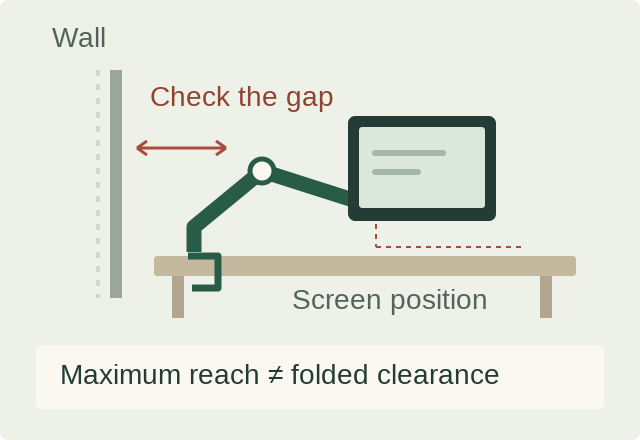
Reach is not folded clearance.
Check the wall, the folded joints, screen position and cable space as separate constraints. Maximum extension does not establish a minimum rear gap.
Look underneath first
A clear edge is only half the story.
The clamp needs room below the desktop, too. Check the lower jaw, any apron or crossbar, and access for tightening before comparing the arms.
A thickness match does not establish desk strength. Confirm the exact mounting requirements and the desk maker’s approval.
Use the fit worksheet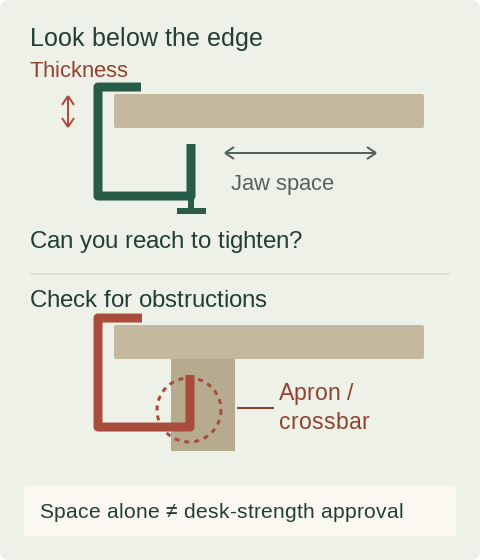
By DeskLilt. Research checked November 23, 2026. We have not bought or hands-on tested these arms. This guide uses AI-assisted research to organize manufacturer documents and identify unresolved fit questions; it does not report installation or performance testing.
A monitor arm can remove a stand from your work surface and still leave the screen too far forward. On a shallow desk against a wall, the deciding questions are where the clamp can sit, where the joints go when folded, and whether the monitor stays within the mount's documented limits.
The Ergotron LX 45-241-224 and VIVO STAND-V001 are two options to investigate, not a ranked list or confirmed zero-clearance solutions. The sources checked do not establish that either will fit your desk flush against a wall. If you cannot confirm the required geometry, keeping your existing stand may be the better decision.
Compare the exact versions
The LX here is the matte-black 45-241-224 with a two-piece desk clamp. Ergotron lists the low-profile top-mount 45-626-224 separately; its clamp specifications must not be substituted. The VIVO is the black STAND-V001, covered by the STAND-V001 Series manual, not STAND-V001O. Neither comparison includes an optional extension or a different mounting kit.
| Check | Ergotron LX 45-241-224 | VIVO STAND-V001 |
|---|---|---|
| Monitor load | 7–25 lb (3.2–11.3 kg), subject to the depth and lift caveats below | 22 lb maximum; a minimum is not stated in the sources checked |
| VESA hole patterns | 75 × 75 and 100 × 100 mm | 75 × 75 and 100 × 100 mm |
| Clamp thickness | Drawing shows a maximum of 2.4 in (60 mm); a universal minimum is not established here | Manual shows 10–85 mm; product page instead lists a 3.25-in maximum. Resolve the difference near the limit. |
| Height adjustment | Specified lift range: 13 in (33 cm), with a heavier-load caveat | Arm position is secured on the pole with an Allen wrench |
| Minimum wall gap for your setup | Not established | Not established |
Sources: Ergotron LX specification sheet, page 2; LX dimensional drawings, pages 2–3; VIVO product specifications; VIVO manual, pages 4–5 and 8. These are manufacturer statements, not independently measured performance.
Fill in this fit worksheet before choosing
Measure the actual mounting location, including its underside. Your desk's advertised thickness or depth alone cannot answer whether a clamp clears a rear apron. Use the small-desk measurement guide for the broader footprint plan.
| Write down | What you must compare |
|---|---|
| Desk model, material and construction | Desk-maker approval for concentrated clamp loads at the intended edge |
| Thickness and shape at that edge | The exact kit's limits and whether the jaw can contact the required surfaces |
| Clear space below and around the clamp | Lower-jaw footprint, inward reach, tightening access and apron/crossbar interference |
| Stand-free monitor mass and exact model | Mount load limits; verify how adapters and attached accessories count |
| VESA pattern, recess and connectors | Mounting-plate clearance and the monitor manufacturer's mounting instructions |
| Wall gap and desired screen position | Clamp protrusion, folded joints, monitor body, connectors and permitted movement |
For glass or hollow tops, obtain the desk maker's explicit approval rather than treating the clamp range as a strength rating. If the construction or approval is unknown, pause. A reinforcement plate, improvised block or drilled hole is not a blanket solution. Follow the exact desk, monitor and mount instructions; this worksheet is not an installation manual.
Why reach does not establish wall clearance
Maximum extension describes reaching outward, not the smallest folded depth or screen setback. Ergotron's sheet lists extension up to 25 in (64 cm), while its dimensional drawing labels 25.6 in (650 mm) in an extended view. VIVO lists a 16-in maximum extension. Those source values do not tell you how little room either arm needs behind your chosen monitor position.
The LX drawing includes a wall-oriented top view, but that sketch is not a universal desktop-edge-to-wall clearance specification. The VIVO sources checked do not establish a minimum folded wall gap. Ask for geometry matching your mounting point and intended position instead of interpreting an arm's longest reach as proof it folds flat.
Check the whole permitted movement path, not just one stationary pose. In particular, VIVO's manual says the monitor must remain over the desktop and must not extend past its edge. Do not solve a wall collision by swinging that monitor off the desktop. Cable routing must also leave the necessary movement and connector space; see the shallow-desk cable guide.
Option: Ergotron LX 45-241-224
Consider investigating the LX if adjustable vertical positioning matters and your exact monitor falls within its documented load requirements. Its specification sheet gives a 13-in (33-cm) lift range. That is a useful distinction from a pole arm whose height is set and secured, but it does not demonstrate fit against your wall.
Read the load footnotes before treating 25 lb as an unconditional allowance. The dimensional document, page 3, says a monitor deeper than 2.5 in (64 mm) may reduce capacity. When adjusted for a load above 20 lb (9 kg), the lower portion of vertical travel can be reduced by up to 4.5 in (114 mm). Ask Ergotron about a deep or heavier monitor rather than promising the full movement range.
The clamp drawing shows different jaw arrangements, not one universal minimum-to-maximum thickness band. Its 60-mm maximum does not prove suitability for every thinner desk. Confirm the exact jaw arrangement, material approval, underside clearance and current kit before buying. Skip this version if the monitor is below its 7-lb minimum, exceeds its applicable capacity, or the mount cannot be installed as documented. For a flush-to-wall desk, keep the geometry question open.
Option: VIVO STAND-V001
Consider investigating the STAND-V001 if you expect to set a monitor's height and secure it on a pole. The manual, page 8, directs you to secure the arm at the desired height using an Allen wrench. This is not evidence of spring-supported, on-the-fly vertical lift. Do not buy it expecting the LX's height-adjustment mechanism.
The manual's clamp diagram shows 10–85 mm; the manufacturer product page lists a 3.25-in maximum, approximately 82.6 mm. That discrepancy matters near the upper limit. Confirm the supplied clamp and applicable limit with VIVO rather than relying on the larger number. Neither a thickness inside both stated limits nor the 22-lb capacity confirms that your desk edge can carry the load.
The manual distinguishes flat and recessed VESA mounting, but a matching pattern alone is insufficient: check the monitor's recess, screw requirements and obstructions against both manufacturers' instructions. Skip this arm if the planned movement takes the monitor past the desktop edge, if required jaw/access clearance is unavailable, or if its load or mounting requirements are not met. Minimum folded wall clearance remains unresolved.
A worked example: some checks pass, the decision still pauses
Hypothetical inputs only—not measurements or testing of either product: a 20-in-deep desk (508 mm), a 25-mm-thick mounting point, a 12-lb stand-free monitor with 100 × 100-mm VESA holes, and no gap between desk and wall. Desk strength approval, clamp access and monitor-depth details have not yet been confirmed.
- Load screening: 12 lb sits between the LX's stated 7- and 25-lb limits and below VIVO's 22-lb maximum. LX depth-related capacity still needs checking; a VIVO minimum was not found.
- Thickness screening: 25 mm is within VIVO's manual range and below its webpage maximum. It is below the LX drawing's maximum, but that alone does not establish the correct jaw arrangement or minimum.
- Pattern screening: 100 × 100 mm appears in both specifications; recess and hardware compatibility remain unchecked.
- Outcome: pause for desk approval, clamp/access geometry and wall clearance. Neither arm earns a confirmed fit from these numbers. Maximum extension cannot fill those gaps.
The calculation is useful because it separates eliminated options from unanswered questions. Do not add up partial matches into an overall compatibility score.
Stop/go checklist
- Stop: a documented material, load, VESA or installation restriction conflicts with your setup. Choose a different arrangement rather than compensating with another feature.
- Pause: a required dimension, desk approval or manufacturer limit is missing or conflicting. Send the manufacturer your desk and monitor models, measurements and intended screen position; ask which exact kit and configuration applies.
- Go to the installation-planning stage: all relevant documented checks agree and the remaining geometry has been confirmed. Follow the supplied instructions. This is not proof of stability, long-term durability or a successful installation.
If neither option clears that process, keep the original stand or investigate a suitable riser with its own footprint and load checks. The monitor-clearance and riser guide explains those space questions. No wall-mount product has been evaluated here.
Purchase links and disclosure
As an Amazon Associate I earn from qualifying purchases. Complete the fit checks and read each exact model's sources and restrictions before following a purchase link.
Sources and research limits
We checked the manufacturer documents linked above on November 23, 2026: Ergotron sheet 05-056 (08.09.2024), dimensional document DIM2-056 (revision 08/29/2024), VIVO's product page and its STAND-V001 Series manual (REV3.1, updated 01/17/25). Manufacturer specifications and our screening comparisons are the evidence used here. We did not use customer reviews or ratings to establish suitability, and we make no current-popularity, price, stock or health claim.
Read how DeskLilt researches products and about DeskLilt. Missing geometry remains missing; an answer from a manufacturer must apply to your exact desk, monitor and mounting kit before it changes this guide's conclusion.
Your next step
Checked the fit? Revisit an option.
Confirm the exact model, kit and unresolved measurements before buying. Keeping your current stand remains an option.